
Cool & Clear - Color Scheme
A tastefully minimal, high contrast, light mode syntax coloring scheme for Sublime Text
Details
Installs
- Total 641
- Win 342
- Mac 134
- Linux 165
| Jan 5 | Jan 4 | Jan 3 | Jan 2 | Jan 1 | Dec 31 | Dec 30 | Dec 29 | Dec 28 | Dec 27 | Dec 26 | Dec 25 | Dec 24 | Dec 23 | Dec 22 | Dec 21 | Dec 20 | Dec 19 | Dec 18 | Dec 17 | Dec 16 | Dec 15 | Dec 14 | Dec 13 | Dec 12 | Dec 11 | Dec 10 | Dec 9 | Dec 8 | Dec 7 | Dec 6 | Dec 5 | Dec 4 | Dec 3 | Dec 2 | Dec 1 | Nov 30 | Nov 29 | Nov 28 | Nov 27 | Nov 26 | Nov 25 | Nov 24 | Nov 23 | Nov 22 | |
|---|---|---|---|---|---|---|---|---|---|---|---|---|---|---|---|---|---|---|---|---|---|---|---|---|---|---|---|---|---|---|---|---|---|---|---|---|---|---|---|---|---|---|---|---|---|
| Windows | 0 | 0 | 0 | 0 | 0 | 0 | 1 | 0 | 1 | 0 | 0 | 0 | 0 | 0 | 0 | 0 | 0 | 0 | 1 | 0 | 2 | 0 | 0 | 0 | 1 | 0 | 0 | 0 | 0 | 0 | 1 | 0 | 0 | 0 | 0 | 1 | 0 | 0 | 0 | 0 | 0 | 0 | 0 | 1 | 0 |
| Mac | 0 | 0 | 0 | 0 | 0 | 0 | 0 | 0 | 1 | 0 | 0 | 0 | 0 | 0 | 0 | 0 | 0 | 0 | 0 | 0 | 1 | 0 | 0 | 0 | 0 | 0 | 0 | 0 | 0 | 0 | 0 | 0 | 0 | 0 | 0 | 0 | 0 | 0 | 0 | 0 | 0 | 0 | 1 | 0 | 0 |
| Linux | 0 | 0 | 0 | 0 | 1 | 0 | 0 | 0 | 0 | 0 | 0 | 1 | 0 | 1 | 0 | 0 | 0 | 0 | 0 | 0 | 0 | 0 | 0 | 0 | 0 | 2 | 0 | 0 | 0 | 0 | 1 | 0 | 0 | 1 | 0 | 0 | 1 | 2 | 0 | 2 | 1 | 2 | 1 | 0 | 0 |
Readme
- Source
- raw.githubusercontent.com
Cool & Clear
A tastefully minimal, high contrast, light-mode syntax coloring scheme for Sublime Text.
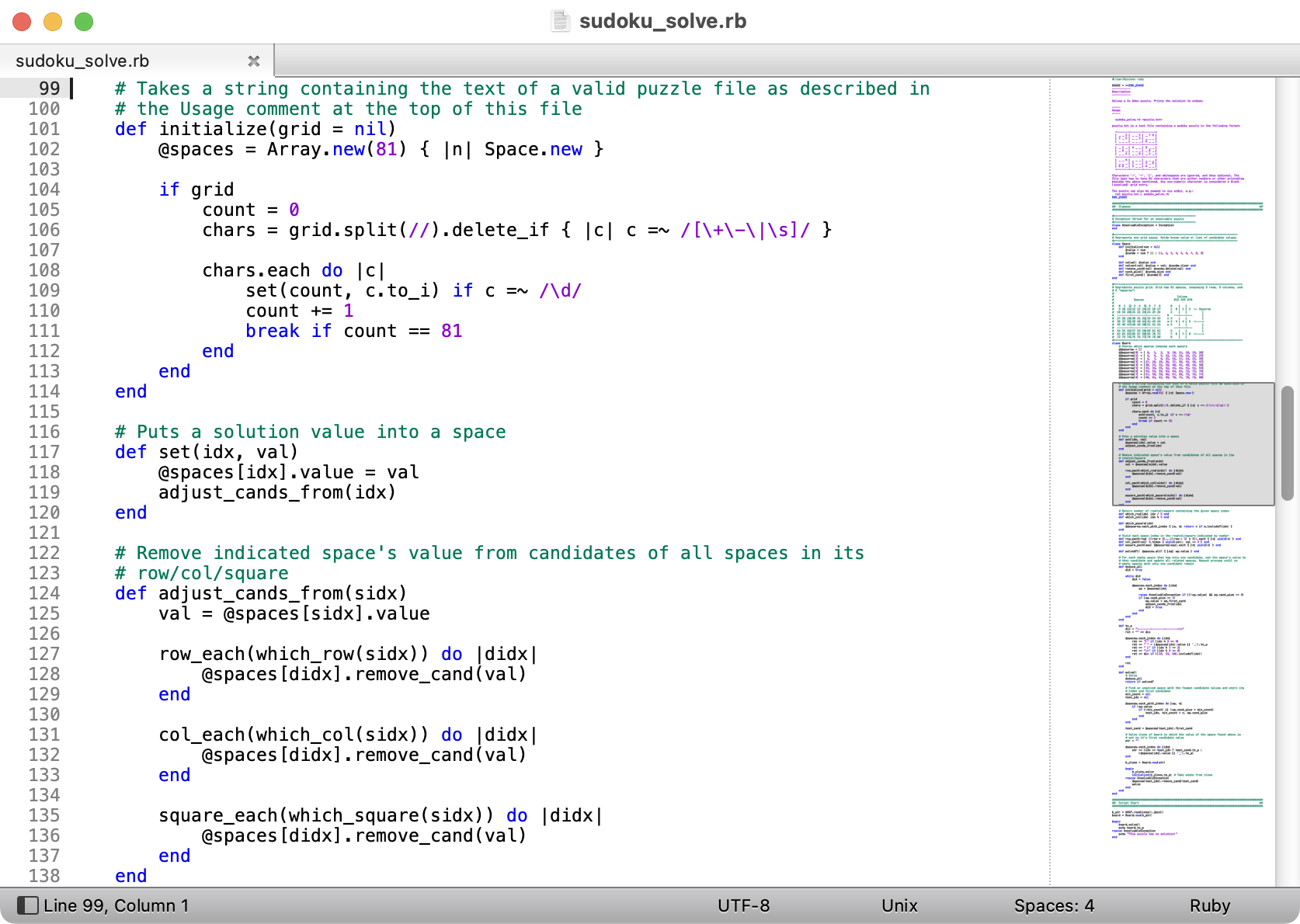
Cool & Clear is…
Tastefully Minimal
Many color schemes use a large variety of colors for various syntactic and semantic elements, resulting in code listings that look quite festive, but which do not necessarily aid comprehension. Cool & Clear keeps it simple by using only a few different colors:
- Green for comments
- Blue for language keywords
- Purple for literals, such as strings and numbers
- Red-on-red for syntax errors (which in practice will rarely be seen)
- Black for everything else
High Contrast
Many color schemes use text colors that do not contrast well with the background, especially for comments. Some schemes go so far as to make comments nearly invisible! Cool & Clear keeps code easy to read by using full white for the background, and sufficiently dark colors for text.
Light-Mode
There seem to be more light-on-dark color schemes available than the reverse. But I prefer to work with dark text on a light background.
Installation
Via Package Control
- In Sublime Text, invoke
Tools > Command Palettein the menu bar - Select
Package Control: Install Packagein the command palette - Type “Cool & Clear” in the search bar, and click on “Cool & Clear” in the list of results
Manual Installation
- Download the
Cool & Clear.sublime-color-schemefile - Invoke
Sublime Text > Settings... > Browse Packages...(Mac) orPreferences > Browse Packages...(Windows) to open thePackagesfolder - Move
Cool & Clear.sublime-color-schemeinto theUsersubfolder
About
Copyright © 2022 Karl von Laudermann. MIT Licensed.